





FREE PUDO LOCKER DELIVERY!
Key Features
- Genuine Creality replacement component
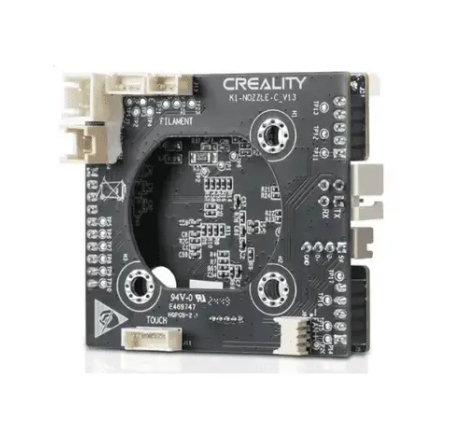
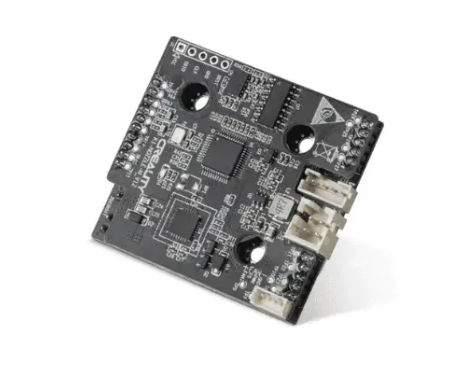
- K1-Nozzle-C V14 PCB
- Toolhead / nozzle control circuit board
- V14 hardware revision
- Replacement for a damaged or faulty original PCB
- Interfaces with toolhead electronics
- Compact printer-specific electronic component
- Suitable for compatible K1 Series toolheads
- Useful for printer repairs and servicing
- Ideal spare for technical workshops and service centres
Toolhead Control PCB
Modern Creality K1 Series printers contain electronic components directly within the printhead assembly.
The Nozzle-C PCB forms part of this system, providing electrical connections between the toolhead components and the printer’s electronics.
A fault with the PCB can potentially affect components or functions associated with the printhead.
V14 Hardware Revision
This replacement board is specifically identified as V14.
This is important because Creality has produced different revisions of components during the lifespan of the K1 Series.
When replacing a PCB, customers should not assume that a board will fit simply because the printer carries the K1 name.
Before ordering, compare:
- Existing PCB revision
- Connector layout
- Printer model
- Physical board design
- Part number where available
If the existing board is marked K1-Nozzle-C V14, this is the appropriate revision to look for.
V14 vs V13
The V14 and V13 designations refer to different PCB revisions.
Although they perform a similar role within the toolhead system, I would not advertise V13 and V14 as automatically interchangeable unless Creality specifically confirms cross-compatibility.
For your 3D Fusion website, keeping V13 and V14 as separate products is the safer approach.
When Might the PCB Need Replacement?
Replacement may be required if the original board has:
- Suffered an electrical failure
- Developed damaged connectors
- Been physically damaged
- Experienced heat-related damage
- Developed intermittent connections
- Been damaged during hotend servicing
- Been diagnosed as the source of a toolhead fault
Because several other components can produce similar symptoms, proper diagnosis is recommended before replacing the PCB.
Diagnose Before Replacing
A printhead-related error does not necessarily mean the PCB has failed.
Similar symptoms can potentially originate from:
- Hotend
- Heater
- Thermistor
- Extruder
- Fans
- Toolhead wiring
- FPC/ribbon cable
- Connectors
- Mainboard
- Firmware
Checking these components first can prevent unnecessary replacement of the PCB.
Genuine Replacement Component
Using the correct Creality replacement PCB helps maintain the intended:
- Connector arrangement
- Electrical integration
- Toolhead configuration
- Communication with the printer
- Physical fitment
With electronic replacement parts, using the correct hardware revision is particularly important.
Installation
Replacing a toolhead PCB involves working with sensitive electronic components.
Before installation:
- Switch the printer off
- Disconnect it completely from mains power
- Allow the hotend to cool
- Photograph the existing wiring before disconnecting anything
- Handle connectors carefully
- Never pull connectors by their wires
- Protect the PCB from static electricity
- Confirm every connector is correctly seated before powering the printer back on
Professional installation is recommended if the user is unfamiliar with printer electronics.
Compatibility
This PCB is intended for compatible Creality K1 Series toolheads using the V14 Nozzle-C PCB.
Because the K1 family includes several models and hardware revisions, compatibility should be confirmed against the existing PCB version before purchase.
Important
Do not assume compatibility solely from the printer name.
For example, a K1, K1C or K1 Max may have different hardware revisions depending on production date and toolhead configuration.
For this reason, the safest compatibility instruction is:
Please check that your existing PCB is marked “K1-Nozzle-C V14” before ordering.
Ideal For
- K1 Series toolhead repairs
- Replacing a faulty V14 PCB
- Repairing damaged toolhead electronics
- Printer refurbishment
- Technical workshops
- Service centres
- Print farms
- Production environments
- Keeping specialised replacement parts available
Technical Specifications
| Specification | Details |
|---|---|
| Brand | Creality |
| Product | K1-Nozzle-C V14-PCB |
| Product Type | Toolhead / Nozzle PCB |
| PCB Revision | V14 |
| Application | Printhead Electronics |
| Printer Family | Creality K1 Series |
| Replacement Component | Yes |
| Electronic Component | Yes |
| Installation | Technical |
| Genuine Creality Part | Yes |
Why Choose the Creality K1 Nozzle-C V14 PCB?
When a toolhead fault has been correctly diagnosed to the PCB, replacing the individual circuit board can be considerably more economical than replacing the complete printhead assembly.
The important factor is selecting the correct PCB revision.
For machines fitted with the V14 board, this replacement allows the original toolhead electronics to be repaired while retaining the rest of the assembly.
What’s Included
- 1 × Creality K1-Nozzle-C V14 PCB


Reviews
There are no reviews yet.